
Article
August 4, 2026 · Last updated on August 31, 2026
From One-Off Request to Reusable Practice: Building Legal Workflows with ChatGPT Work

A practical workflow for government legal teams

Laura Keenan
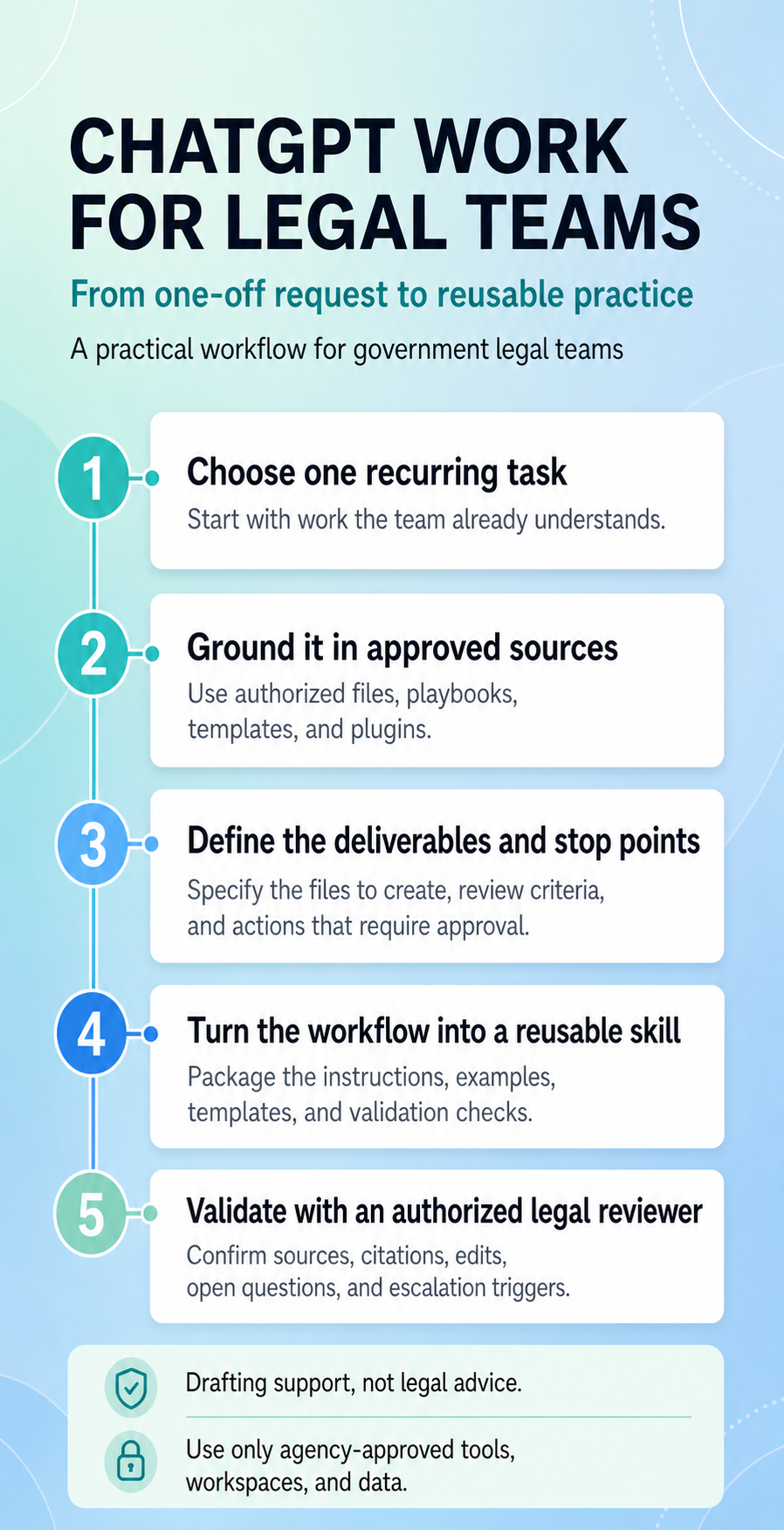
Government legal work is full of tasks that look familiar but are never quite identical: reviewing vendor paper, preparing a first-pass memorandum, tracking issues across agreements, or packaging matter updates for leadership. The legal judgment changes with the facts. Much of the surrounding process does not.
That distinction creates a useful opportunity for AI. ChatGPT Work is designed for longer, multi-step tasks with a clear outcome—such as a document, analysis, workflow, or file that a person can review and use. It can help a legal team move beyond an isolated prompt and complete a structured workflow grounded in the team’s approved templates, playbooks, and source materials.
The goal is not to automate legal judgment. It is to make the work around that judgment more consistent, transparent, and reviewable.
Start with one recurring task
The best place to begin is a task the team already understands well. Contract review is a strong example because it combines a recognizable process with concrete inputs and outputs.
A legal team might regularly need to:
- compare vendor paper with an internal contracting standard;
- identify deviations and escalation triggers;
- suggest edits or fallback language;
- add reviewer comments with supporting references; and
- produce a redlined document and issue log for attorney review.
A one-off request can help with a single agreement. A reusable ChatGPT Work workflow goes further: it carries the team’s instructions, reference materials, output requirements, and quality checks into each new review—and can produce the documents and tracking files the reviewer needs.
Ground the work in approved sources
Reliable legal support starts with clear boundaries. In ChatGPT Work, identify the files and approved plugins the task may use, then state what ChatGPT should do when those sources do not answer the question.
For a contract-review workflow, the approved source set might include:
- the agreement under review;
- an internal vendor-paper playbook;
- approved fallback clauses;
- a review checklist;
- a redline and comment format; and
- a sample output created for training with fictional or de-identified information.
The workflow should distinguish facts in the source material from inferences, identify missing information, and flag unsupported points instead of filling the gaps. These requirements are especially important when the output may inform a legal, procurement, financial, or operational decision.
Define the deliverable—not just the analysis
Prompts often stop at “review this contract.” A stronger instruction describes the completed work product.
For example:
In ChatGPT, switch to Work. Review this vendor agreement against the approved standards in this folder. Use only the files I provide. Create a Microsoft Word redline using tracked insertions and deletions. Add a comment to each modified clause that identifies severity, any escalation trigger, the preferred position or fallback, the supporting playbook section, and a brief rationale grounded only in the provided materials. Create a separate issue log for attorney review. If the materials do not support a conclusion, say so and identify the open question. Stop before sharing, sending, or taking any action outside this chat.
This gives ChatGPT Work a clearer definition of done. It also makes the output easier to inspect: reviewers can see what changed, why it changed, which standard supports it, and where human judgment is still required.
The same approach can support other legal workflows. A team could use an approved memorandum template to create a source-grounded first draft, analyze a folder of agreements for specified risk flags, or turn matter files into a leadership brief with deadlines, open questions, and next actions.
Turn the repeatable method into a skill
Once the team has tested and refined the workflow, it can turn the method into a reusable skill for ChatGPT Work. A skill packages the instructions, templates, examples, and quality checks for a focused task, reducing the need to paste the entire process into every new chat.
A legal contract-review skill might contain:
- Intake instructions that confirm the document type, business context, jurisdiction, review scope, and required output.
- Review instructions that compare the agreement only against approved playbooks and reference files.
- Output requirements for the redline, clause-level comments, issue log, and file format.
- Validation checks for source support, unresolved issues, output completeness, and attorney escalation.
The skill should define which reference files it may use, include safe examples, and state the tests the output must pass before the team relies on it. If the workflow needs access to an approved document repository or another external system, the team can use a plugin that combines the skill with the appropriate connector. Those connections remain subject to workspace controls and the user’s permissions in the source system.
Start with a narrow, read-only or low-risk pilot when possible. Expand only after legal, privacy, security, records, and IT stakeholders have reviewed the workflow and its access boundaries.
Build human review into the design
ChatGPT Work does not provide legal advice or replace legal judgment. Its output should be treated as drafting and analysis support until an authorized legal professional reviews it.
Before using or sharing an output, reviewers should confirm:
- the correct sources and internal standards were used;
- quoted language, page references, and citations are accurate;
- the analysis separates facts, assumptions, and open questions;
- edits reflect the organization’s current legal and risk posture;
- required escalation triggers were identified; and
- the final legal position has been approved by the appropriate attorney.
For government work, use only agency-approved products, workspaces, tools, and data sources. Follow applicable policies for privileged, procurement-sensitive, controlled, classified, personally identifiable, or other protected information. Training and early pilots should use fictional, synthetic, public, or properly de-identified materials unless the relevant authorities have approved another approach.
A practical path to adoption
The most useful AI workflows usually begin with a small, visible win:
- Choose one recurring, well-understood task.
- Assemble the approved instructions, sources, and templates.
- In ChatGPT, switch to Work and define the output and attorney-review checkpoints.
- Test the workflow on fictional or de-identified examples.
- Compare results across several runs and reviewers.
- Turn the stable method into a reusable skill; add approved plugins only when the workflow needs connected tools or data.
- Monitor the workflow and update it when standards change.
The value is not simply a faster first draft. It is a clearer path from source material to reviewable work—one that makes the team’s standards easier to apply, the output easier to validate, and the final decision unmistakably human.
Keep learning
Learn how to get started with ChatGPT Work , then explore skills and plugins for repeatable workflows. Before using organizational data, review your agency’s policies and workspace configuration.
Dive in
Related
Resource
How to get started guide: Conducting performance reviews with ChatGPT Work
By Laura Keenan • Jul 20th, 2026 • Views 61
Resource
U.S. House of Representatives Prompt Pack for Communications Directors
By Laura Keenan • Sep 18th, 2026 • Views 24
Resource
From a Full Calendar to Executive Readiness: Five ChatGPT Work Prompts for Government Executive Assistants
By Laura Keenan • Aug 11th, 2026 • Views 49
Resource
A veteran's guide to using ChatGPT Work for a career transition
By Laura Keenan • Jul 31st, 2026 • Views 67
Resource
How to get started guide: Conducting performance reviews with ChatGPT Work
By Laura Keenan • Jul 20th, 2026 • Views 61
Resource
From a Full Calendar to Executive Readiness: Five ChatGPT Work Prompts for Government Executive Assistants
By Laura Keenan • Aug 11th, 2026 • Views 49
Resource
A veteran's guide to using ChatGPT Work for a career transition
By Laura Keenan • Jul 31st, 2026 • Views 67
Resource
U.S. House of Representatives Prompt Pack for Communications Directors
By Laura Keenan • Sep 18th, 2026 • Views 24