
Prompt Packs
August 11, 2026 · Last updated on August 31, 2026
From a Full Calendar to Executive Readiness: Five ChatGPT Work Prompts for Government Executive Assistants
Leveraging ChatGPT Work for government executive assistants

Laura Keenan
An executive assistant rarely receives the day in a neat package. The calendar sits in one place. The context for a meeting may be scattered across email, briefing documents, and notes from three weeks ago. A decision deadline may appear in one message but not the task tracker. Meanwhile, new requests keep arriving.
The job goes well beyond calendar management. It means turning incomplete information into a day an executive can navigate and making sure commitments do not disappear after the meeting ends.
ChatGPT Work can help with that preparation. It is designed for substantial tasks with a clear outcome, such as a brief, analysis, spreadsheet, recurring update, or other file that a person can review and use. It can work across multiple steps and approved source materials, while allowing the user to guide the work and approve important actions. Learn more about ChatGPT Work .
For executive assistants, the most useful starting point is not “manage my office.” It is one concrete, repeatable assignment with a clear definition of done.
Start with the work around the decision
Government executives make decisions and represent their organizations. Executive assistants make that work possible: protecting time, assembling context, coordinating participants, tracking deadlines, and preparing the next action.
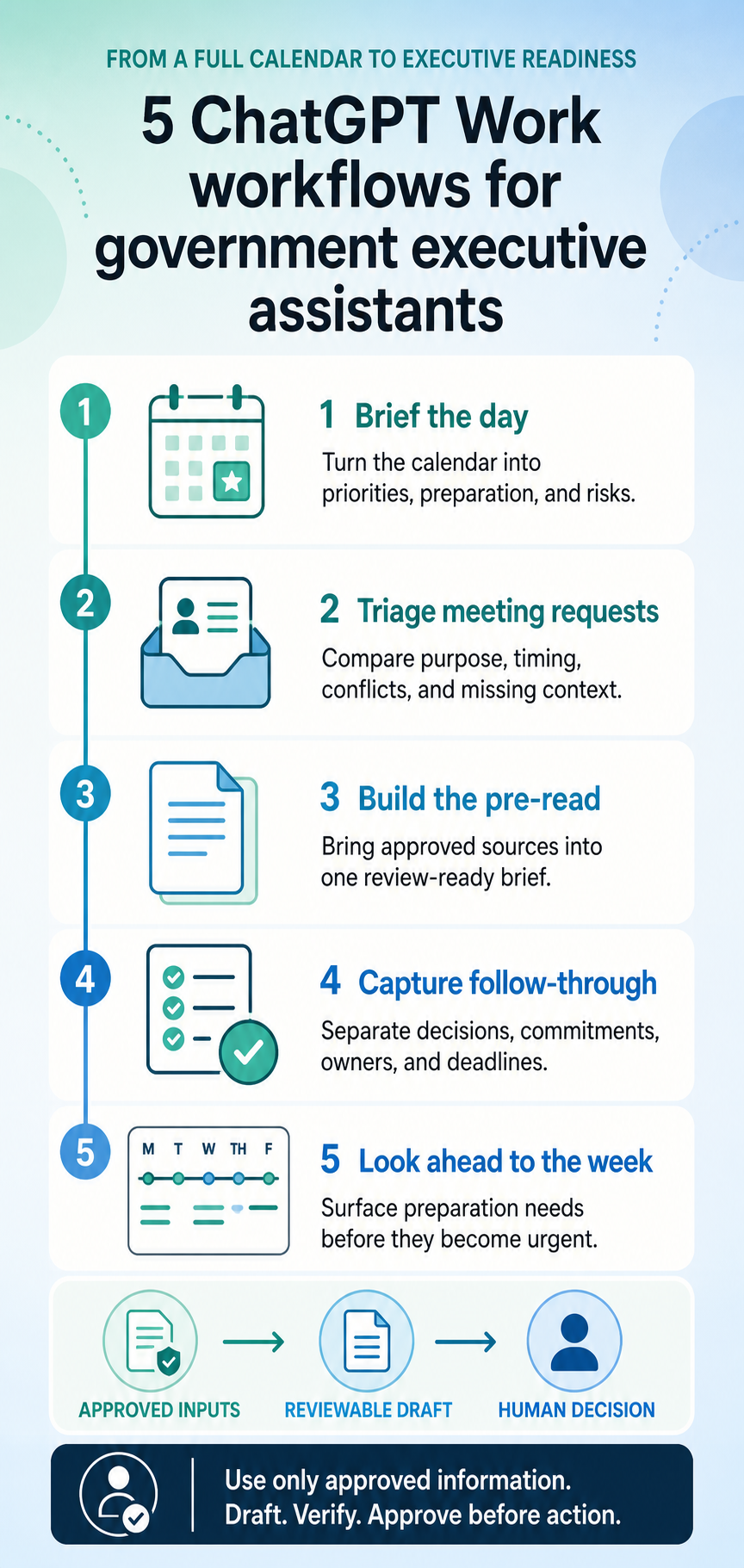
AI can support the work around those decisions without taking ownership of them. A strong workflow asks ChatGPT Work to organize approved information, create a reviewable draft, surface gaps, and stop before it sends, schedules, books, files, or publishes anything.
The five examples below are designed for federal, state, and local government settings. Replace the bracketed text with your own details, use only information approved for your workspace, and adapt each prompt to your office’s policies.
1. Turn tomorrow’s calendar into an executive brief
A schedule tells an executive where to be. A daily brief explains what each meeting is for, what preparation matters, and where the day may break down.
In ChatGPT, switch to Work and try:
Prepare a one-page daily brief for [Executive name and title] for [Date]. Use the attached approved calendar export and meeting materials. Organize it as: top priorities; schedule with purpose, participants, location, transition time, and preparation needed; decisions due; follow-ups; and risks or conflicts. Separate confirmed facts, reasonable inferences, and missing information. Put conflicts and unverified details first. Do not change the calendar, contact participants, or send the brief.
A useful result should be easy to scan in a few minutes. It should also make uncertainty visible. If a location, participant, or desired outcome has not been confirmed, the brief should say so rather than quietly filling the gap.
2. Triage meeting requests without losing the human context
Meeting requests can look equally urgent when they arrive. They rarely are. The challenge is to compare them against the executive’s priorities, deadlines, protocol requirements, and existing commitments without reducing people to a simplistic score.
Review the meeting requests for [Review period] and produce a recommendation queue for human review. For each request, capture the requester, purpose, deadline, requested attendees, estimated duration, protocol considerations, missing information, and a proposed disposition: accept, delegate, seek more information, or decline. Explain the rationale without judging a person’s importance. Identify conflicts and propose two schedule options where appropriate. Do not accept, decline, move, or send any invitation.
The result is a structured review queue, not an automated gatekeeper. The executive assistant still applies office knowledge, relationship context, and judgment before anything changes.
3. Build a meeting pre-read from approved sources
Executives often need to absorb a large amount of context quickly. A pre-read can bring the essentials together: why the meeting matters, who is involved, what has already happened, and what outcome the office wants.
Create a two-page pre-read for [Meeting] with [Participants] on [Date]. Use only the attached and approved sources. Include: purpose; why this matters now; participant roles; relevant history; current status; decisions or outcomes sought; three likely questions; recommended talking points; and items to verify. Cite each factual claim to its source or label it unverified. Keep the analysis neutral and do not invent positions for participants. Return a draft for review; do not circulate it.
The source boundary matters. Tell ChatGPT Work which documents it may use, what to do when sources conflict, and where the work should stop. For a meeting involving current public information, you can also ask it to use authoritative public sources and link each current claim.
4. Turn meeting notes into accountable follow-through
The work after a meeting is easy to underestimate. Notes may mix decisions, ideas, questions, and tentative commitments. A good follow-up workflow keeps those categories separate.
Prepare a follow-up package for [Meeting] using the attached approved notes. Produce: a short thank-you email draft; a confirmed action list with owners and dates; and a one-paragraph internal record of the meeting’s outcome. Distinguish commitments actually made from ideas discussed, and flag any wording that could create a new obligation. Do not send messages, create tasks, or file the record until a human approves each item.
The prompt asks for three small, connected deliverables rather than a generic summary. It also guards against a common error: treating a suggestion raised in conversation as an approved commitment.
5. See the week before the week sees you
A weekly look-ahead gives the office time to resolve conflicts, prepare materials, and chase missing inputs before they become same-day emergencies.
Build a weekly look-ahead for [Date range]. Review the approved calendar, task list, and current briefing materials. Identify major commitments, preparation deadlines, decision points, travel or event logistics, and unresolved dependencies. Produce a concise executive overview, a day-by-day table, and a preparation checklist with owners and due dates. Mark items as confirmed, pending, or at risk. Draft only; do not create tasks, update calendars, or notify owners without approval.
Run this workflow at a consistent point in the week, then compare the output with what the office already knows. The goal is not to add another report. It is to identify the few items that need attention while there is still time to act.
What makes these prompts work
Each example gives ChatGPT Work five things:
- A defined task. “Create a one-page daily brief” is clearer than “prepare me for tomorrow.”
- Approved context. The prompt names the files and sources that may be used.
- A specific deliverable. The format, audience, and required sections are explicit.
- A verification standard. Missing facts, conflicting sources, and assumptions must be visible.
- A stopping point. The prompt says what requires human review and which actions must not happen automatically.
That last point is especially important for executive-office work. Drafting a message is different from sending it. Recommending schedule options is different from changing the calendar. Preparing travel choices is different from making a reservation.
Use government information responsibly
Follow your organization’s rules for approved products, workspaces, tools, and data. Do not enter classified, controlled, privileged, procurement-sensitive, personal, or otherwise restricted information unless your organization has explicitly authorized that use.
Capabilities may also depend on your ChatGPT Enterprise seat, workspace settings, permissions, and administrator controls. If your workspace provides approved plugins or connected tools, ChatGPT Work can use them within the access available to the user. A workflow should still name the sources it may use and stop before consequential external actions unless a person has reviewed and approved them.
Dive in
Related
Blog
ChatGPT Prompt Pack for Congressional Staff Assistants
By Laura Keenan • Sep 21st, 2026 • Views 55
Blog
ChatGPT Prompt Pack for Congressional Staff Assistants
By Laura Keenan • Sep 21st, 2026 • Views 55