
Article
September 15, 2025 · Last updated on September 4, 2026
Tasks

# Workplace & Business
# ChatGPT
# Advanced & Builder Skills
# Work
# Portfolio Academy Knowledge Work
Let ChatGPT run automated prompts and deliver the result to you.
Tasks
Tasks let ChatGPT proactively perform an instruction at a future time (once or on a schedule) and deliver the result back to you in a push notification or an email.
Use them for nudges (e.g., “prep me for my 1:1 on Mondays”) and for lightweight automations (e.g., “summarize five industry stories every morning and include links”).
How to start
- Open a chat and describe what you want and when: “Every weekday at 9am, summarize the top 3 headlines about our industry with source links.”
- Confirm the schedule when ChatGPT proposes it.
- That’s it—your task is saved. You’ll see confirmation in the chat.
Tip: Use clear names in your first sentence (e.g., “Daily Finance Brief…”) so you can spot the task later.
How to manage your Tasks
- Open tasks: Profile > Notifications > Manage tasks
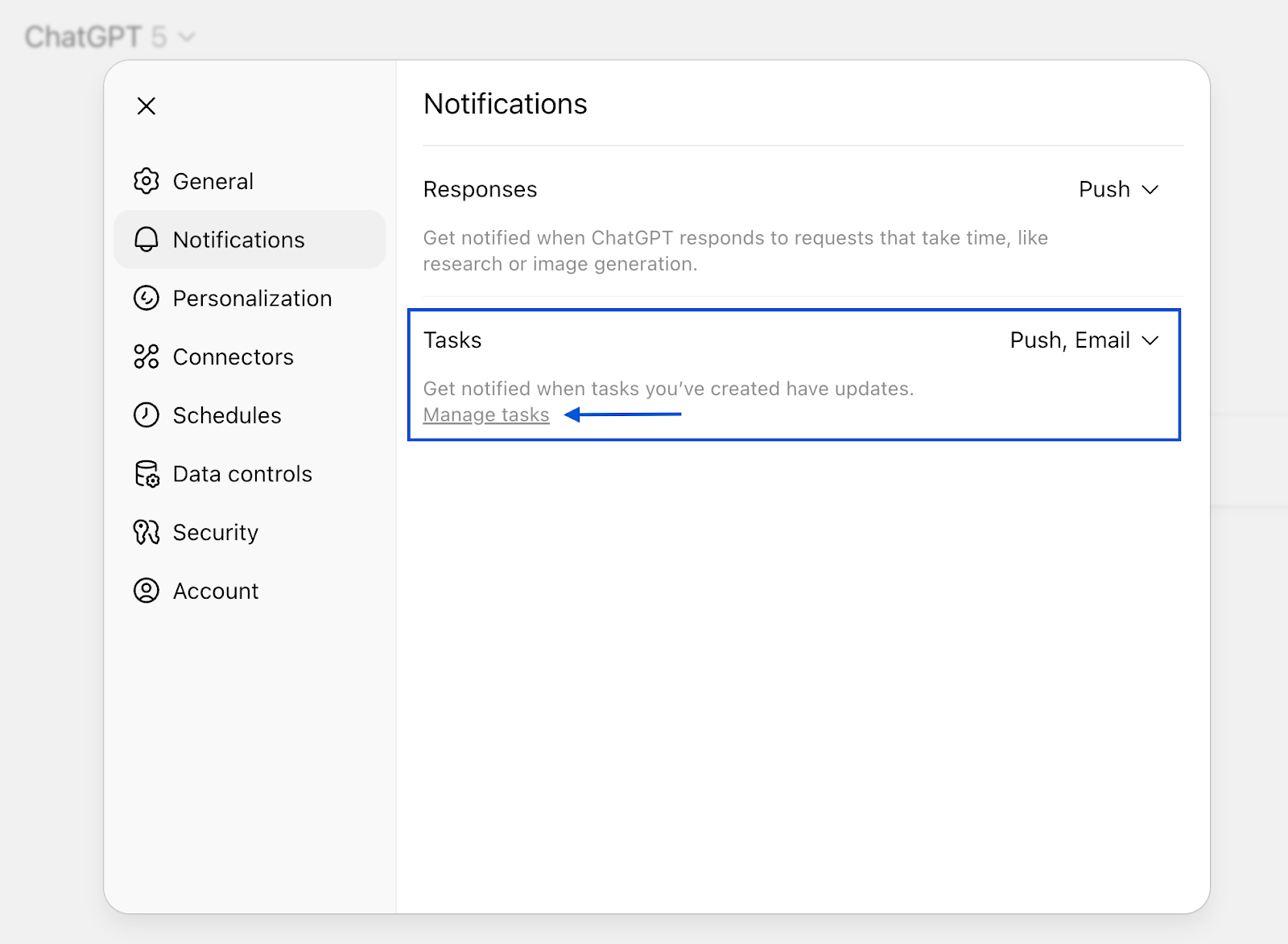
- Edit from "Manage tasks": Use the ✏️ icon to edit, pause, or delete your task.
- Edit from chat: Follow up in the original conversation with a new schedule or edits (e.g., “make this weekly on Fridays at 4pm”).
Common use cases for tasks
Many tasks fall into a few repeatable patterns. Recognizing these helps you write clearer, reusable instructions.
- Briefing: Use when you need a concise summary. The output is typically short bullet points, links, and—if helpful—suggested next steps.
- Prep checklist: Use when you want to organize notes into a practical format. This often results in an agenda, a list of decision points, or a set of guiding questions.
- Data pulse: Use when reviewing datasets, dashboards, or reports. The output is usually a small table of metrics accompanied by short commentary or insights.
- Personal productivity: Use when you need light structure or motivation. These tasks provide gentle prompts such as end-of-day reflections, planning priorities for tomorrow, or reinforcing routines.
Suggested tasks by role
Here are some examples of how different roles might use tasks:
Role | Example Task | Why it’s helpful |
Executive | “Every weekday at 7:30 AM, compile a concise 5‑bullet summary of competitor news, market shifts, and regulatory updates with links and a 2‑sentence ‘Why it matters.’” | Keeps leadership continuously briefed on external factors that impact strategy and decision‑making. |
Manager | “Fridays at 3:00 PM, draft a weekly digest from this week’s chat notes including highlights, blockers, upcoming deadlines, and team priorities in <200 words.” | Saves time and ensures managers always share consistent updates, boosting clarity and alignment. |
Sales rep | “Tuesdays at 9:00 AM, scan top 5 accounts for news on funding rounds, leadership changes, or major launches; summarize and flag possible revenue opportunities.” | Helps reps stay ahead of client developments, strengthening relationships and driving pipeline. |
HR/People Ops | “On the first day of each month, compile a list of upcoming birthdays and work anniversaries from the attached spreadsheet; draft a short celebratory announcement ready to share with the team.” | Builds community and recognition culture while saving HR manual effort each month. |
Best practices
- Be explicit about timing & timezone. If global teams are involved, specify the timezone in the instruction (e.g., “9:00 AM ET”).
- Name the output shape. Tables, bullets, headings, or a specific template.
- Pin or attach references. Link the docs, data, or resources a task should use.
- Add guardrails. Limit length, include sources, or ask for confirmation before actions.
- Iterate in place. After a run, reply with tweaks (e.g., “Make it 3 bullets and add competitor news”).
Additional resources
- Help Center: Using Tasks — Overview of how to create, edit, and manage Tasks in ChatGPT.
Dive in
Related
Resource
ChatGPT Work for marketing teams: Webinar Resource Guide
By Diana Stegall • Aug 27th, 2026 • Views 2.4K
Resource
ChatGPT Work for business operations teams: Webinar Resource Guide
By Diana Stegall • Aug 26th, 2026 • Views 1.3K
Resource
ChatGPT Work for marketing teams: Webinar Resource Guide
By Diana Stegall • Aug 27th, 2026 • Views 2.4K
Resource
ChatGPT Work for business operations teams: Webinar Resource Guide
By Diana Stegall • Aug 26th, 2026 • Views 1.3K