
Article
April 23, 2026
Understanding Workspace Agents in K-12 education
# Educators & Students
# Leaders & Admins
# OpenAI API
# ChatGPT
# Deployment & Adoption
# Education
# K12 Teachers - Organize and Scale AI
How districts and schools can use Workspace Agents to support educators, staff, and administrators

Kirk Gulezian
This article provides an overview of what workspace agents are and how they can support useful, repeatable workflows in education settings. For detailed guidance on how to set up workspace agents, please review this Help Center article.
Districts and schools manage a lot of work that repeats across campuses, grade levels, departments, and school years.
Workspace Agents in ChatGPT are designed for that kind of structured, repeatable work. They help K-12 teams turn a familiar process into a reusable workflow, so educators and staff do not have to start from scratch each time.
What is an agent?
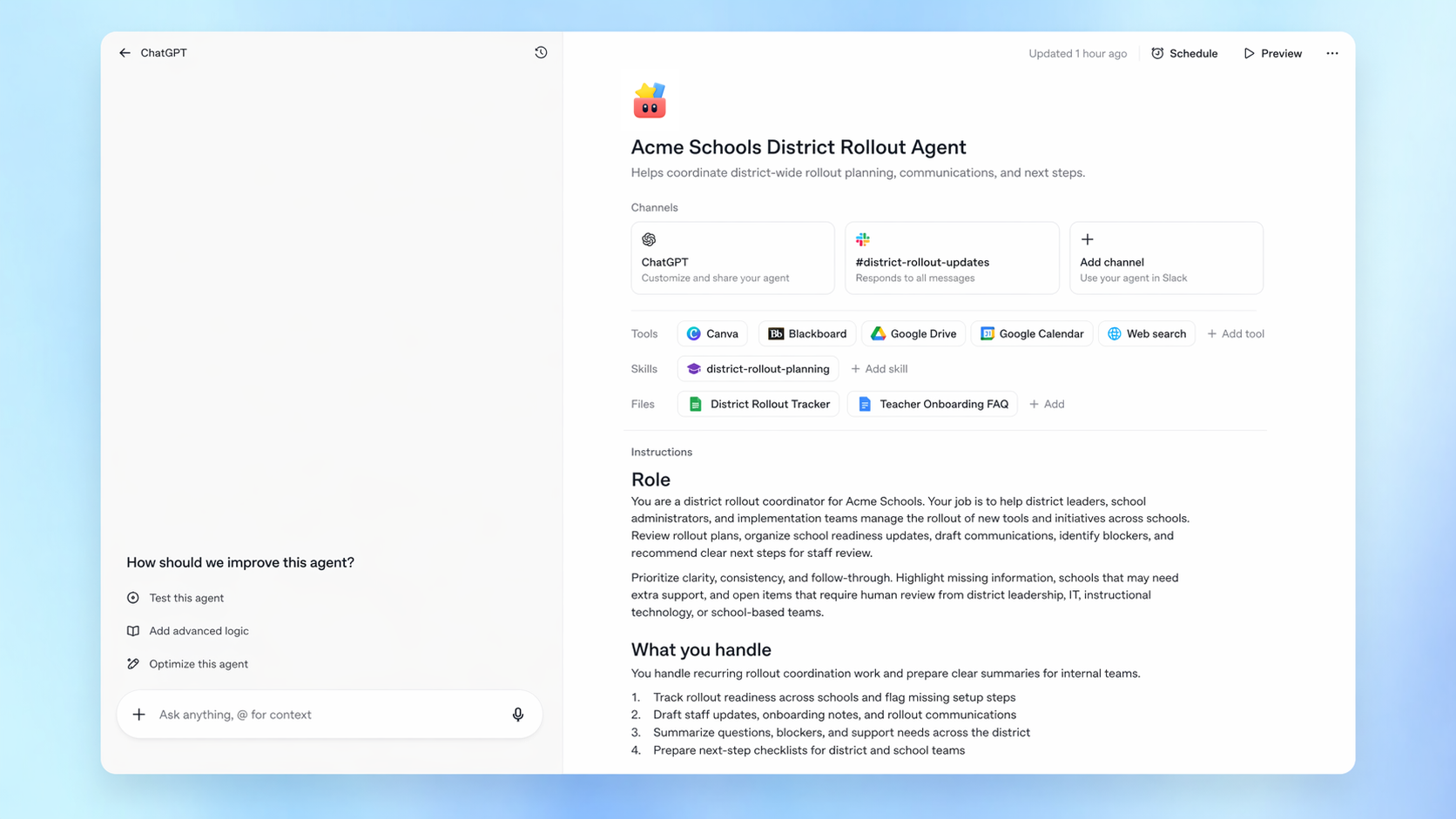
An agent is a reusable workflow in ChatGPT that can be given a clear job, a set of instructions, and access to approved tools or files. It can follow steps, gather context, draft outputs, and, when allowed, help move work forward across connected apps.
A simple way to think about an agent is:
- A trigger: what starts the work, such as a manual request, a new form submission, or a scheduled run.
- A process: the steps the agent should follow.
- Tools and context: the approved files, apps, or systems it can use.
- Guardrails: what it should check, when it should pause, and when it should ask for human approval.
Agents are best suited for workflows that are repeatable, structured, and easy for a person to review. For one-time writing help, exploratory questions, or open-ended brainstorming, regular ChatGPT is often the better place to start.
How agents differ from regular ChatGPT
Many people use ChatGPT for one task at a time: summarize this document, draft this email, explain this policy, or help brainstorm ideas.
Agents are different because they are built for workflows that happen more than once. A team can define the process once, test it, improve it, and share it with others in the workspace.
For example, regular ChatGPT might help a principal draft one staff meeting agenda. An agent could support a recurring workflow that gathers agenda items, summarizes prior action items, organizes updates by owner, and prepares a draft agenda for review every week.
The person or team still stays in control. Agents should be reviewed, corrected, and guided, especially before anything is shared, sent, or used for a decision.
Ways K-12 teams might use agents
For K-12, agents should focus on educator, staff, administrator, and district workflows. These examples are designed for adult users, including teachers, instructional coaches, principals, district leaders, IT teams, and central office staff.
District rollout support agent
A district team could use an agent to support the rollout of a new tool, curriculum, policy, or initiative across schools.
The agent could organize launch materials, draft staff communications, prepare role-specific FAQs, track which schools have completed setup steps, and flag where follow-up is needed.
For example, during a ChatGPT for Teachers rollout, the agent could prepare a principal update, a teacher onboarding note, an IT checklist, a family-facing FAQ, and a weekly implementation status summary for district leadership.
This helps central office teams support schools more consistently without rebuilding the same rollout materials for every audience.
Professional development planning agent
An instructional leadership team could use an agent to plan and support recurring professional development.
The agent could gather session goals, draft agendas, create facilitator notes, prepare follow-up resources, and summarize participant feedback after each session.
For example, after a district-wide training, the agent could review approved feedback forms, identify common questions from teachers, draft a follow-up email, and recommend topics for the next session.
This helps professional learning teams turn feedback into useful next steps.
School leadership meeting agent
A principal or school leadership team could use an agent to prepare for recurring staff meetings, grade-level meetings, or leadership team check-ins.
The agent could gather agenda items from shared documents, summarize previous action items, organize updates by owner, and draft a meeting agenda with clear next steps.
After the meeting, the agent could help turn notes into a follow-up summary for staff review.
This helps school leaders keep meetings focused, organized, and easier to act on.
Curriculum resource alignment agent
A curriculum and instruction team could use an agent to help organize instructional resources across grade levels or subject areas.
The agent could review approved curriculum documents, map resources to standards, identify gaps in a unit plan, and draft planning templates for instructional coaches or teachers.
For example, a district math team could use an agent to organize unit resources, identify where teachers need supplemental practice materials, and prepare a coaching guide for an upcoming PLC.
This helps curriculum teams support teachers with clearer, more consistent resources.
PLC planning agent
A school or district instructional team could use an agent to support professional learning communities.
The agent could gather meeting notes, organize common assessment results, summarize trends, draft discussion questions, and prepare action items for the next PLC.
For example, after teachers review assessment data, the agent could summarize areas where students struggled, organize suggested reteaching resources, and prepare a planning template for the next meeting.
This helps PLCs spend more time discussing instruction and less time organizing materials.
Family communications agent
A district or school communications team could use an agent to help draft family-facing communications for recurring needs.
The agent could prepare plain-language drafts, translate approved messages when appropriate, create FAQs, and adapt the message for email, SMS, newsletter, and website formats.
For example, the agent could support communications around schedule changes, curriculum nights, technology access, attendance reminders, or new district resources.
All family-facing content should be reviewed and approved by the appropriate staff before it is sent.
Substitute preparation agent
A teacher, school administrator, or office team could use an agent to help prepare substitute materials.
The agent could gather the teacher’s approved plans, classroom routines, seating notes, emergency procedures, and relevant resources into a clear substitute packet.
For example, if a teacher is unexpectedly out, the agent could help prepare a structured plan for the day, including schedule notes, student support reminders, materials needed, and a simple summary for the substitute.
This helps schools respond faster while still keeping final review with the teacher or administrator.
Operations reporting agent
A district operations team could use an agent to prepare recurring reports for leadership.
The agent could gather approved weekly inputs from transportation, facilities, IT, staffing, and school operations. It could then draft a concise leadership update with open issues, completed work, risks, and decisions needed.
For example, the agent could prepare a Friday update that summarizes bus route issues, open facilities tickets, device replacement needs, staffing gaps, and items that require district leadership attention.
This helps central office teams stay aligned without manually rebuilding the same report every week.
Policy and handbook update agent
A district leadership or operations team could use an agent to help manage recurring policy and handbook updates.
The agent could compare draft updates against approved source documents, flag sections that may need legal or leadership review, prepare a summary of changes, and draft staff-facing guidance.
For example, when a district updates its acceptable use policy or AI guidance, the agent could help prepare a clean summary for principals, teachers, and families.
This helps districts communicate policy changes more clearly and consistently.
Choosing a good first workflow
The best first agent is usually a workflow your team already understands.
Look for work that has a clear start, a clear set of steps, and a clear human reviewer. Good first workflows often include:
- Recurring updates or reports
- Intake forms or request routing
- Meeting preparation
- Resource organization
- Draft communications
- Internal handoffs
- Checklists and status summaries
- Training follow-ups
- Rollout tracking
- Family communication drafts
A strong first agent should save time, reduce repetitive work, and make the process easier to follow.
For K-12 teams, a good place to start might be a district rollout tracker, a professional development follow-up workflow, a staff meeting preparation workflow, a student support referral workflow, or a family communications workflow.
Using agents responsibly
Start with low-risk workflows. Choose tasks where the output is easy to review, the process is already understood, and mistakes can be caught before anything is shared or acted on.
Keep humans in the loop. Agents can support work, but people should review outputs, check context, and approve sensitive actions.
Review before sharing. Drafts, summaries, emails, documents, and recommendations should be checked by the right person before they are sent, published, or used in decision-making.
Be thoughtful about permissions. Give agents access only to the tools, files, and actions they need. Admins should consider role-based access, approval steps, and data boundaries before enabling broader use.
Align with district policies. Schools and districts should use agents in ways that fit their existing policies for privacy, security, records, communications, accessibility, student data, and responsible AI use.
Test before scaling. Try agents with realistic examples, review their outputs, refine the instructions, and gather feedback before sharing them widely.
Getting started
Workspace Agents are an early opportunity for K-12 teams to explore how AI can support shared, repeatable work.
Start with one workflow that happens often. Define the steps. Decide what the agent can access. Add clear review points. Test it with realistic examples. Then refine before sharing it more broadly.
The strongest agents usually begin with familiar work: the weekly update, the staff meeting agenda, the training follow-up, the rollout checklist, the family communication, the support referral, or the operations report.
Start small, learn from real use, and expand thoughtfully as your district understands where agents can be most useful.
Comments (0)
Popular

Popular
Dive in