Practice better CRM hygiene with Codex
# Codex for Work
# Activators
# Use Cases
Turn scattered customer account context into structured CRM updates using Codex
June 18, 2026Workflow at a glance
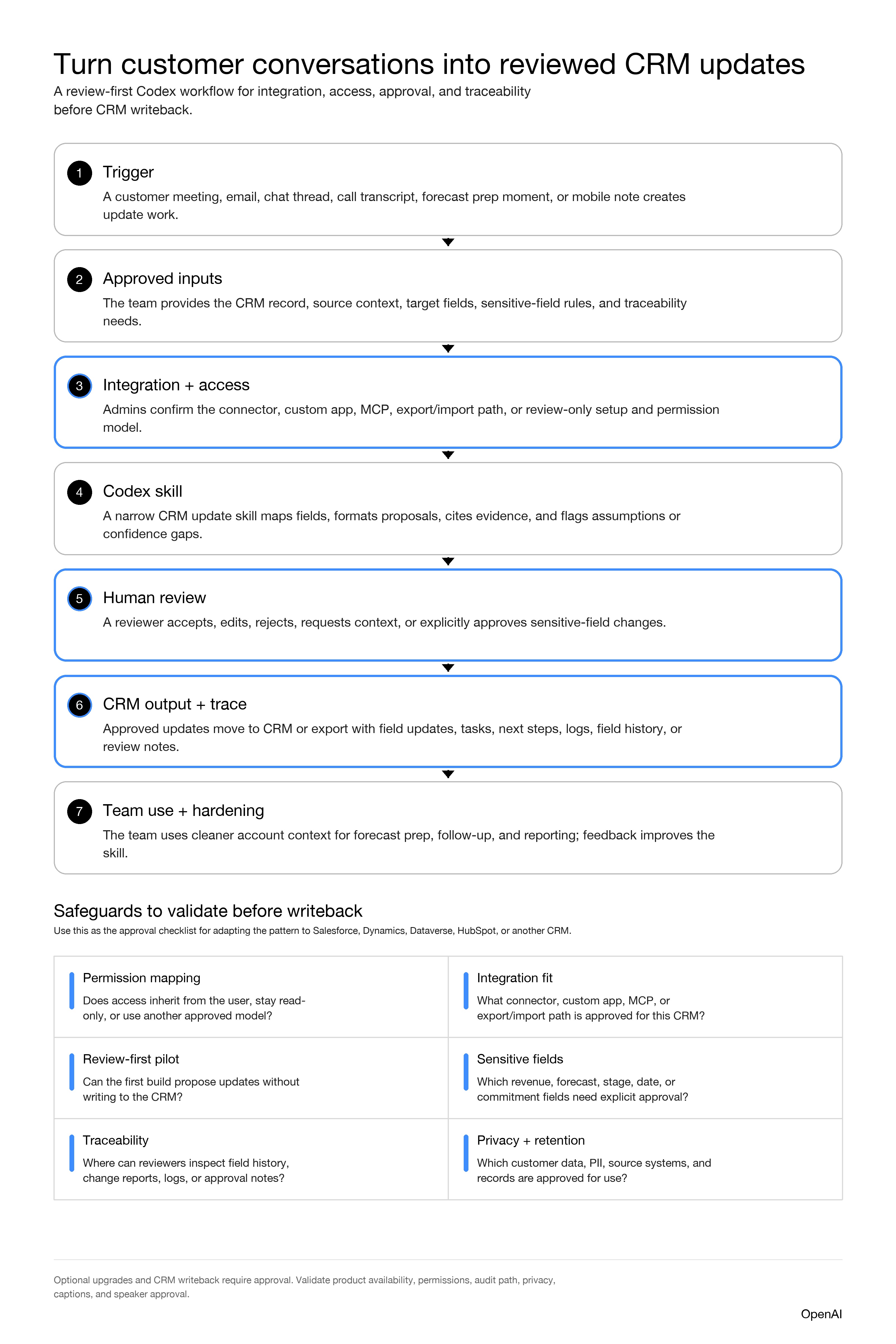
Business Problem: Account teams have useful customer context spread across meetings, notes, messages, emails, call transcripts, and CRM records, but customer-facing teams often delay or skip CRM hygiene because they have to manually translate this scattered customer context into structured CRM updates, next steps, tasks, summaries, and forecast or opportunity fields.
Workflow Description: Codex helps turn approved customer/account context into proposed CRM updates. A reusable CRM update skill defines the role, target fields, output format, integration path, and guardrails. A human reviews the proposed changes, especially sensitive fields, before anything is written to the CRM or shared with the team.
AI Workflow Build: Start with a Codex Project like the example below that creates a narrow CRM update skill, a field map, an integration/access plan, a review rubric, a traceability plan, and a simple review hub or review table. Default to read/review-first. Add CRM writeback only after the right system, security, privacy, CRM admin, and business owners approve it.
Suggested Inputs: CRM record URL or account/opportunity ID; current CRM field values; meeting notes; call transcript; email thread; Slack or Teams thread; target field list; sensitive-field rules; permission model; audit/logging requirements; reviewer instructions; approved examples of good updates.
Expected Output: Proposed CRM field updates, next steps, task recommendations, account or opportunity summary changes, confidence gaps, assumptions, evidence notes, approval flags, and a review log. If approved and technically enabled, the workflow can later write selected changes back to the CRM.
Human Responsibilities: Provide approved source context, confirm the right CRM record, review proposed changes, explicitly approve sensitive fields, verify written updates, inspect logs or field history where configured, handle missing evidence, and keep the skill current as the team learns.
Probable Stakeholders: Account owners; sales managers; RevOps or sales ops; CRM admin; IT or workspace admin; enterprise architecture or integration owner; security/privacy; audit or compliance; legal if regulated data, customer commitments, or revenue-impacting fields are involved.
Suggested Pilot Scope: One team, one CRM object, one or two repeat update moments, and a small set of demo or approved test accounts. For example: post-meeting opportunity updates for next steps, summary, contract dates, and tasks.
Permissions / Access Considerations: Start from what each user is already allowed to read and write in the CRM. Confirm object permissions, field-level permissions, source-system access, connector/app permissions, and who owns the integration. Keep write access off until the review model is approved.
Integration Considerations: If your CRM has an approved connector or app path, validate how it scopes read/write access. If your team uses a CRM without a ready-made path, ask your technical partners whether a custom integration using approved tools such as Apps SDK or MCP is appropriate.
Governance Considerations: Treat CRM as a system of record. Define how changes will be traced, who is accountable for the final update, which logs or field-history reports reviewers can inspect, what approval is required for high-impact fields, and what data cannot be used.
This is not a shortcut around your CRM, IT, security, privacy, or RevOps processes. The strongest Activators ask questions about integrations, access, traceability, logs, confidence, and approval boundaries, and treat these considerations as part of the workflow design, not as cleanup after the demo works.
What to customize
The copy/paste spec below is intentionally opinionated so a non-technical Activator can get started quickly. Change these items first:
- Team and workflow context: Replace
[TEAM NAME],[ROLE OR FUNCTION], and[CRM UPDATE MOMENT].
- CRM system and integration path: Replace
[CRM SYSTEM]and[INTEGRATION PATH]. If you do not know the path yet, name the technical owner who can decide it.
- CRM objects and fields: Replace
[TARGET CRM OBJECTS],[TARGET FIELDS], and[SENSITIVE OR APPROVAL-REQUIRED FIELDS].
- Source context: Replace
[APPROVED SOURCE SYSTEMS]with the systems your team is allowed to use.
- Permission model: Replace
[PERMISSION MODEL]with how access should be scoped, such as user-level permissions, service-account permissions, or review-only export. If unknown, leave it for IT/admin review.
- Traceability and logs: Replace
[TRACEABILITY REQUIREMENTS]with what reviewers need to see, such as CRM field history, change reports, app logs, or compliance logs where available.
- Review owners: Replace
[REVIEWERS AND APPROVERS]with the people or teams who must approve the first build.
- Default setup: The spec defaults to a Codex Project, a reusable skill, and a simple Sites-hosted review hub. If your team wants a different review surface, change the Sites bullets before pasting.
- Write actions: The default is read/review-first. Only change that after CRM admin, security/privacy, and business owners approve writeback.
- Pilot scope and measurement: Replace
[PILOT SCOPE],[SUCCESS SIGNALS], and[MEASUREMENT OWNER].
Copy/Paste Codex Project Spec
Paste this into Codex in Plan Mode. Fill in the bracketed fields first if you can. If you are not sure about a field, leave it bracketed and ask Codex to help you define it.
Review rubric
Use this rubric to help decide what a human should review before an update is accepted, exported, or written to CRM.
Review area | What to check | Escalate when |
|---|---|---|
Record match | Codex selected the right account, opportunity, contact, or task. | The source context could refer to more than one record. |
Evidence | The proposed update is supported by meeting notes, transcript, email, chat, or CRM context. | Evidence is missing, stale, contradictory, or based on interpretation. |
Field risk | The field is allowed for this workflow and has the right approval level. | The field affects revenue, forecast, stage, dates, customer commitments, legal terms, or regulated data. |
Proposed wording | Summaries and next steps are concise, accurate, and appropriate for team visibility. | Wording overstates certainty, includes private details, or creates an external commitment. |
Traceability | The reviewer can tell what changed, why, who approved it, and where to inspect logs or field history. | There is no practical review trail for a system-of-record change. |
Skill improvement | Any rejected or edited output produces a clear instruction improvement. | The same mistake repeats or the workflow depends on unstated human judgment. |
What the requirements doc should help decide
Use the requirements doc to bring the right people into the decision before the workflow touches live systems. It should make these decisions explicit:
- Which CRM fields are in scope for the first build.
- Which fields require explicit human approval.
- Which source systems Codex may use.
- Which integration path is approved for the CRM and source systems.
- Whether permissions inherit from the user or require another approved access model.
- Whether the first version is review-only, export-assisted, or allowed to write to CRM.
- Who owns the review queue and final accuracy of updates.
- How the team will verify auditability, logs, field history, and record retention.
- What would make the workflow unsafe or out of scope.
What the adoption plan should include
Keep the first rollout small and practical:
- Start with one team and one CRM update moment.
- Use demo data or approved test accounts first.
- Have account owners compare proposed updates against the source context.
- Ask reviewers to mark each proposal as accepted, revised, rejected, missing evidence, or blocked by approval.
- Collect short feedback on what the skill misunderstood and what instruction would have helped.
- Feed repeated edits into the skill so review behavior becomes part of the workflow.
- Expand only when reviewers trust the output quality and the governance path is clear.
Signs the workflow is working
Do not claim impact until you have measured it. Early signs can include:
- Teammates use the workflow more than once.
- Reviewers accept or lightly edit most low-risk proposed updates.
- CRM next steps and summaries become more consistent.
- Account owners spend less time reconstructing context after meetings.
- Fewer CRM records are missing basic update fields before forecast or account review.
- Reviewers can trace what changed and why.
- The skill improves as rejected or edited outputs are fed back into the instructions.
Like
Sign in or Join the community

Create an account